E-Fabrication · Unit 05
Flat-to-3D Design
Laser Cutting · 2 xTool laser cutters
Today’s challenge
Create interlocking parts for a standing object.
Grade 3 focusTrace and simplify bold shapes, use teacher templates, and test one slot size.
Grade 5 focusCreate measured vector files, compare kerf/slot tests, nest parts, and justify assembly choices.
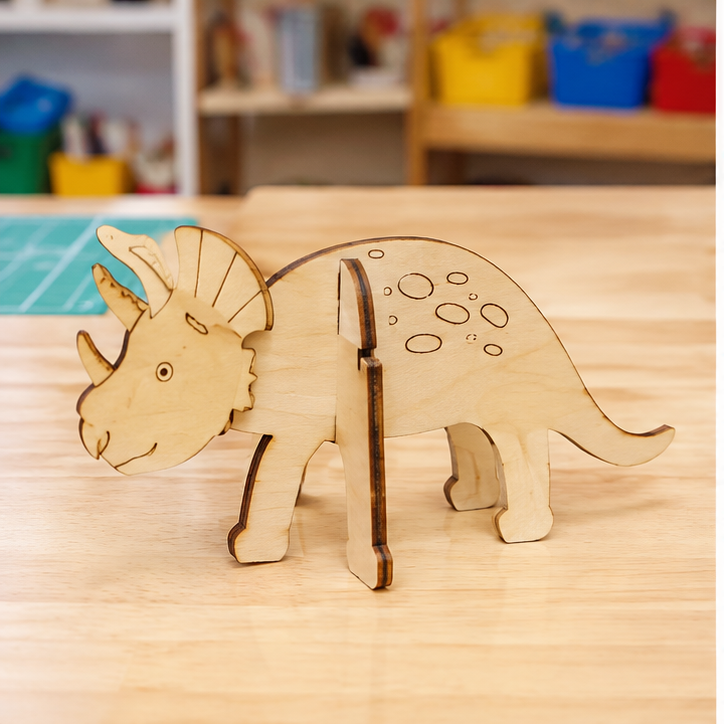
Success example · inspiration, not a design to copy
Look closely. What makes this successful?
Flat parts assemble into a stable three-dimensional object.
What to do
- Understand. Read the challenge. Circle the important need, rule, or safety limit.
- Plan. Use the thinking spaces below before you begin making.
- Make. Build, model, code, practice, or investigate carefully with your team.
- Check. Use evidence—not guesses—to decide what worked.
- Improve or explain. Make one useful change or share your strongest conclusion.
Engineer’s thinking
1. Who are you designing for?
2. What must your idea do?
3. What limits must you follow?
4. Sketch and label at least two ideas.
Evidence check
Show what you learned.
Your teacher will look for: An assembled cardboard prototype and a labeled flat-parts plan.
My evidence
My next step
Exit reflection
Today I learned that because .
Next time I will .
How independently did I work?□ I needed coaching□ I worked with my team□ I can teach this skill