Beginner sequence · Step 3 of 3
Start here
Readiness check: Students can explain an open and closed circuit. Begin with the Grade 3 build sequence if the circuit itself is new; reliability testing can continue in another meeting.
Exact starter recipe
POWER OFF before connecting. Use insulated clips with exposed metal kept apart.
Battery holder + (red lead) → 330 Ω resistor → red LED anode (+, long leg)
LED cathode (−, short leg / flat rim) → foil pad A
Foil pad B → battery holder − (black lead)
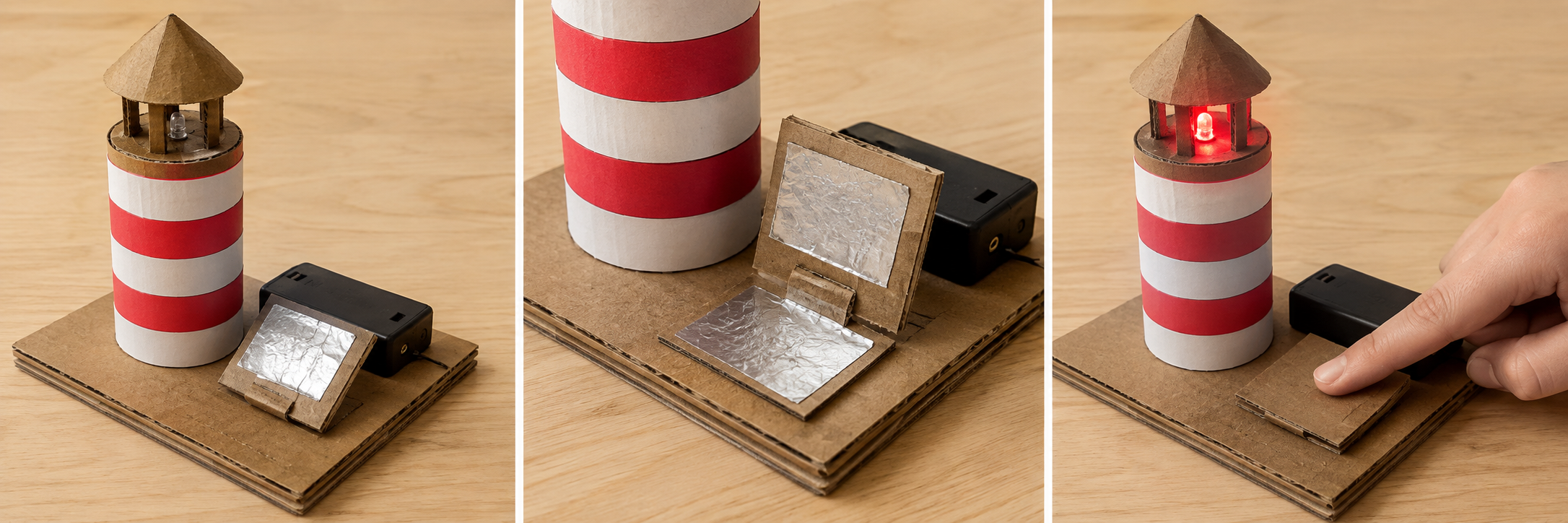
Leave an air gap between the pads; pressing the cardboard flap brings A and B together.
Teacher checks the loop, resistor, LED polarity, and absence of a short before power-on.
Release = gap = light off. Press = contact = light on.
Illustrative photographs are NOT a wiring diagram; follow this connection list.
Make the simplest version work first. Then use the test and extension in this lesson.
Teacher learning resources
- SparkFun: LED polarity and current-limiting resistors ↗
- Science Buddies: closed, open, and short circuits ↗
Preview external resources before class. The circuit reference explains the science; use this page’s specified AA kit and connection list for the build.
For teachers
Engineering standards
This shows how the lesson connects to the national NGSS engineering standards and what student work you can collect.
3-5-ETS1-1
Define the user's need for lighthouse switch: make it reliable and agree on the listed success criteria and limits.
What students show: A stated user need and checked criteria; this is engineering-design practice, not a separate coding standard.3-5-ETS1-2
Compare two possible routes, pet behaviors, or switch arrangements before selecting one for the user.
What students show: Two small plans and a reason for the selected design.3-5-ETS1-3
Repeat the stated test under the same conditions, identify a failure, change one feature, and retest.
What students show: Before-and-after test entries and an explanation connecting the change to the result.Materials
- Covered switched holder with two AA alkaline cells, teacher-issued
- One standard red LED and one 330 Ω resistor per pair; adult confirms ratings
- Four or five insulated clip leads; teacher prepares connections
- Cardboard tube and broad cardboard base, paper tape, two foil pads
- Thin folded cardboard flap and small paper spacer; no spring metal or hot glue
- Printable design brief
- Two paper spacer designs of different heights; ruler
Teacher preparation
- Check readiness: Students can explain an open and closed circuit. Begin with the Grade 3 build sequence if the circuit itself is new; reliability testing can continue in another meeting.
- Build and adult-check one baseline lighthouse circuit using the connection list.
- Prepare two spacer heights, such as one and two folds of the same paper. Measure actual heights rather than assuming each fold adds an exact amount.
- Mark one press position; agree that a successful trial is on during press and off within one second of release.
- Prepare the printable design brief at the end of this page. Use the project picture as inspiration, not a technical diagram or a required artistic finish.
Step by step
How to teach it
Meet the beginner challenge
- Build a press-to-light lighthouse, then improve the switch so another student can turn it on and off reliably across ten trials.
- Read the criteria together. Ask students to predict what the system should do.
Model one working action
- Build the same single-LED lighthouse and series loop shown in the connection list, with power disconnected.
- Choose one spacer design and mark where a visitor should press. Record its height or number of folds.
- Use the exact starter recipe below. Ask a student to explain the action before demonstrating a second step.
Compare two small plans
- Sketch or arrange two possible solutions using the same materials.
- Compare each plan against the criteria; choose one and state a reason.
Build the smallest working version
- Get adult power approval. Ask a partner to perform ten gentle press-and-release trials at the marked spot.
- Record a success only if the light comes on during the press and goes off within one second of release.
- Disconnect power. Change only the spacer height, not the circuit, flap, foil, press location, or tester.
Check and save
- Show one working action. Record where you stopped and what you need next.
- Switch off and disconnect the battery holder; an adult stores components.
- Return materials and reset the workspace.
Rebuild understanding
- Read the saved plan and predict the first test.
- Adult rechecks the circuit before power-on.
Test fairly
- Use the same tester and marked press position; wait about two seconds between trials.
- Record each trial separately rather than judging from the best attempt. Count successful on-and-off cycles out of ten.
- Change spacer height with power disconnected, retest, and compare. If both designs pass, explain a usability difference or propose a harder test without claiming improvement.
Improve one thing
- Identify the first point where the result differed from the prediction.
- Change one instruction, code block, or mechanical feature. Repeat exactly the same test.
- If the core skill is secure, offer the extension; otherwise use the support option.
Share evidence and clean
- Let another pair try the project with your directions.
- Use the worksheet to show an original result, a change, and the new result.
- Switch off, disconnect, and return the battery holder to the adult.
Assessment
- A safe complete circuit includes the LED and its series resistor.
- Ten baseline and ten revised trials are recorded with the same success rule.
- Only spacer height changes; the conclusion matches the evidence.
- Student predicts an outcome before testing.
- Test record distinguishes expected and actual results.
- Student explains why the revision helps; neat decoration and speed are not assessment criteria.
Supports & extensions
- Use an adult-checked light circuit and a prepared switch. Record five trials per version before extending to ten.
- Offer larger cards or tools, a stabilized work surface, picture cues, partner assistance, and spoken or dictated evidence.
- Extension after success: After the controlled comparison, ask a new tester to try the selected switch and discuss whether the result generalizes.
Safety & responsible use
- Use only two AA alkaline cells in a covered, switched holder (nominal 3 V), one red LED, and a 330 Ω series resistor. Teacher checks component ratings and the complete circuit before switching on.
- Never join battery terminals directly. Disconnect the holder before changing connections. Stop immediately and tell an adult if anything warms, leaks, or smells unusual.
- No coin/button batteries, mains wiring, soldering, loose wire stripping, or lithium cells. Adults prepare leads and cover sharp ends; collect all components afterward.
- Keep liquids away; do not wear the circuit or put parts in the mouth. This is a tabletop model, not a real navigation or safety light.
No-machine alternative
Use a mechanical contact indicator that shows when the two pads touch; record that it tests switch motion only, not electrical performance.
Printable student design brief
The challenge
Build a press-to-light lighthouse, then improve the switch so another student can turn it on and off reliably across ten trials.
Success criteria
- A safe complete circuit includes the LED and its series resistor.
- Ten baseline and ten revised trials are recorded with the same success rule.
- Only spacer height changes; the conclusion matches the evidence.
Constraints
- Only the teacher-approved 3 V kit; adult approval before power-on.
- Use two 45-minute meetings; start with the working system before decoration.
- Keep test conditions consistent and change only one feature at a time.
Engineer’s notes
Printable beginner test record
Predict. Try. Improve.
Name ____________________ Partner ____________________
Our success rule: __________________________________________________
| Trial | Input / action | Expected result | First result | Result after one change |
|---|---|---|---|---|
| 1 | ||||
| 2 | ||||
| 3 | ||||
| 4 | ||||
| 5 | ||||
| 6 | ||||
| 7 | ||||
| 8 | ||||
| 9 | ||||
| 10 |
Use three rows for the introductory tests or all ten for switch reliability. Write the held, released, or other-key state for each sensing test.
One thing we changed: ______________________________________________
Things we kept the same: ____________________________________________
Our evidence shows: _________________________________________________