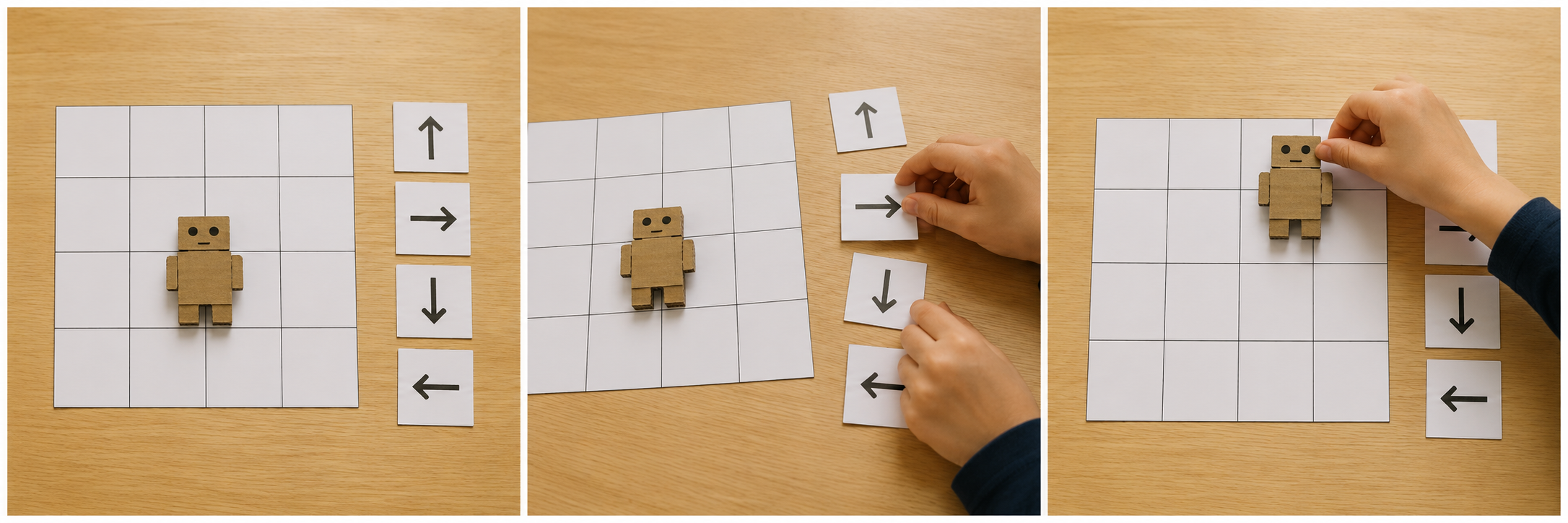
Beginner sequence · Step 1 of 3
Start here
Readiness check: Can students move a token one square and identify its front? Rehearse turns physically with the token, not a student walking blindfolded.
Exact starter recipe
Start at bottom-left, facing up. Put the goal two squares above and one square right.
FORWARD → FORWARD → TURN RIGHT → FORWARD
A turn changes the facing direction but stays in the same square.
Reset the token to the same start and direction before every run.
Make the simplest version work first. Then use the test and extension in this lesson.
For teachers
Engineering standards
This shows how the lesson connects to the national NGSS engineering standards and what student work you can collect.
3-5-ETS1-1
Define the user's need for robot route: follow my arrows and agree on the listed success criteria and limits.
What students show: A stated user need and checked criteria; this is engineering-design practice, not a separate coding standard.3-5-ETS1-2
Compare two possible routes, pet behaviors, or switch arrangements before selecting one for the user.
What students show: Two small plans and a reason for the selected design.3-5-ETS1-3
Repeat the stated test under the same conditions, identify a failure, change one feature, and retest.
What students show: Before-and-after test entries and an explanation connecting the change to the result.Materials
- Paper 4 × 4 square grid, start marker and goal marker
- Large cardboard robot token with a clear front arrow
- Paper command cards: forward one square, turn left, turn right; repeat cards for Grade 5
- Pencils, timer optional, and printable design brief
Teacher preparation
- Check readiness: Can students move a token one square and identify its front? Rehearse turns physically with the token, not a student walking blindfolded.
- Prepare the example grid and label the token’s front.
- Model the difference between a turn and a step; leave room around the tabletop.
- Prepare the printable design brief at the end of this page. Use the project picture as inspiration, not a technical diagram or a required artistic finish.
Step by step
How to teach it
Meet the beginner challenge
- Make a paper program that guides a tabletop robot from its start square to a delivery square without a partner guessing what you mean.
- Read the criteria together. Ask students to predict what the system should do.
Model one working action
- Place your robot on the marked start square, facing the arrow. Choose a delivery square.
- Practice forward one square and a right turn that stays in place.
- Use the exact starter recipe below. Ask a student to explain the action before demonstrating a second step.
Compare two small plans
- Sketch or arrange two possible solutions using the same materials.
- Compare each plan against the criteria; choose one and state a reason.
Build the smallest working version
- Arrange command cards from left to right. Read each card aloud.
- Ask your partner to move the robot exactly as the cards say—no guessing or extra moves.
- If it goes wrong, stop at the first unexpected square. Change one card and restart.
Check and save
- Show one working action. Record where you stopped and what you need next.
- Keep the command cards in order in a labeled envelope.
- Return materials and reset the workspace.
Rebuild understanding
- Read the saved plan and predict the first test.
- Reset the starting state and test the simplest action.
Test fairly
- Use the same start, facing direction, and delivery square each time.
- Record where the robot ends in three runs and whether anyone needed extra spoken help.
- Circle the first incorrect instruction; revise it and rerun from the start.
Improve one thing
- Identify the first point where the result differed from the prediction.
- Change one instruction, code block, or mechanical feature. Repeat exactly the same test.
- If the core skill is secure, offer the extension; otherwise use the support option.
Share evidence and clean
- Let another pair try the project with your directions.
- Use the worksheet to show an original result, a change, and the new result.
- Save or label the work, then return materials.
Assessment
- A partner reaches the delivery square using only the cards.
- Turns do not move the token into another square.
- Three reset-and-run tests are recorded.
- Student predicts an outcome before testing.
- Test record distinguishes expected and actual results.
- Student explains why the revision helps; neat decoration and speed are not assessment criteria.
Supports & extensions
- Begin with two forward cards on a straight route. Add one turn only after the pair can reset and repeat.
- Offer larger cards or tools, a stabilized work surface, picture cues, partner assistance, and spoken or dictated evidence.
- Extension after success: Add one blocked square and find another route without adding spoken hints.
Safety & responsible use
- Use a tabletop grid and large paper cards. Do not blindfold students or use a walking robot activity near furniture.
- Use school scissors with adult-prepared cardboard tokens; keep small pieces away from younger visitors.
No-machine alternative
This lesson is already unplugged. Draw arrows and move a large paper token instead of making separate cards.
Printable student design brief
The challenge
Make a paper program that guides a tabletop robot from its start square to a delivery square without a partner guessing what you mean.
Success criteria
- A partner reaches the delivery square using only the cards.
- Turns do not move the token into another square.
- Three reset-and-run tests are recorded.
Constraints
- Tabletop only; one command moves or turns the token, not both.
- Use two 45-minute meetings; start with the working system before decoration.
- Keep test conditions consistent and change only one feature at a time.
Engineer’s notes
Printable beginner test record
Predict. Try. Improve.
Name ____________________ Partner ____________________
Our success rule: __________________________________________________
| Trial | Input / action | Expected result | First result | Result after one change |
|---|---|---|---|---|
| 1 | ||||
| 2 | ||||
| 3 | ||||
| 4 | ||||
| 5 | ||||
| 6 | ||||
| 7 | ||||
| 8 | ||||
| 9 | ||||
| 10 |
Use three rows for the introductory tests or all ten for switch reliability. Write the held, released, or other-key state for each sensing test.
One thing we changed: ______________________________________________
Things we kept the same: ____________________________________________
Our evidence shows: _________________________________________________